

Ligo's tools: master of organisation & tech
Notion, Atext, Thunderbird, a headset and a keyboard that change your life: Pierre Ligonie shares the organisation and tech tools we swap internally at TOOGO. His 2025 finds, unfiltered.
Notion
The tool to complement TOOGO for managing your agency efficiently — small or large — and/or your life in general. We adopted it more than a year ago at TOOGO and it changed everything in terms of internal flow.
It's hard to describe everything it does, because it does many, many things. It helps create a digital work environment that's at once rich, flexible and personalised.
It makes content creation, project tracking, the creation and management of databases, the organisation of your internal knowledge base easier, and helps you find the information you're missing without having to search everywhere — all boosted by AI on the more "high-end" subscriptions.
It's disconcerting at first, because the field of possibilities is huge and the first page you create is… blank.
Its logic rests on guidance: the tool invites you to describe what you want to accomplish, then guides you through implementing it and suggests ways to go further than your initial idea. Whereas other software shows you everything it can do with endless menus and settings, without managing to support the user. It's a bit like the difference between an all-you-can-eat buffet and a fine-dining restaurant.
Tip
To get off to a good start: identify a concrete project, for example "organise my rounds for IFTM 2025." With Notion, you'll be able to:
- organise the list of contacts to meet and plan your appointments;
- turn the audio recording of your interviews into synthetic notes;
- structure a post-show follow-up calendar;
- create one or more presentation sites to share the essential information during your exchanges…
…and the list of ideas is only beginning.
At TOOGO, switching to Notion also let us better identify areas for improving the user experience in our own solution.
It's several mountains with 5,000 m passes to cross to reach their level, maybe even a change of planet… but we have an idea of the direction, and we've even started walking that path! Really!
Atext (a handy little tool)
A tool discovered by Sébastien — we share the tips internally at TOOGO!
It lets you insert text into any application from an abbreviation. Put like that, it's obscure and you wonder what it could be for, BUT in fact it's darned handy and quickly addictive.
Example
You type merCi and it replaces that word with:
Hello, Thank you for contacting us, we have received your request and will respond to it within the day. Looking forward to meeting you. Pierre
There's a capital C in merCi to avoid this replacement happening every time you write "merci" in an email… otherwise you can quickly become a bore when chatting with your friends.
You type the first 4 digits of one of your phone numbers and it replaces it with the full number. Handy for the forms we fill in… everywhere, several times a day. You type RIBpro and it replaces it with the bank details of your business account, RIBperso with those of your personal account.
The possibilities are endless, since you're the one who defines the abbreviation and what replaces it — with the option to add formatting to the replacement text, HTML, and other abbreviations. It saves precious minutes a day and avoids typos.
Because at TOOGO, we share everything…
Thunderbird
The only mailbox and calendar management tool the world should know. I've been using it for 20 years, it's always been top-notch and far better than the best-known ones on the market.
It's free, open source and incredible. It's developed by the Mozilla foundation, which also makes Firefox <3 and always puts data privacy and user security at the heart of its products. It now comes in desktop and mobile versions.
It allows the management of several mailboxes on a single interface, with lots of layout customisation. I personally manage 5 personal emails and 4 professional ones on it, in a very smooth and seamless way.
The number of extensions you can add means any of your wishes will find an answer. I love, for example, the Quickfolder Move extension, which lets me create shortcuts to certain folders of certain mailboxes to access them in one click, and/or drag an email into that folder without having to look for it in the move functions.
In short, forget Outlook, Mac Mail, Gmail online… switch to Thunderbird and install it everywhere!
Hardware tips — my 2025 finds
We're not too into gadgets at TOOGO, but I am a little. It's genetic, I think…
Shokz OpenRun or OpenMove headset

The first time you put it on, it feels a bit "I'm off for my jog in Central Park… (or Perk?)." Strange, especially when you don't run, BUT it's darned handy!
I use it for all my calls, video calls, podcast listening. It's light, discreet, and you're not constantly putting it on and taking it off to hear what's going on around you. Very easy too to mix listening and an "in-person" conversation.
So go from the "teen with the big headphones cut off from the world" style to the "busy busy runner" one.
Logi Ergo K860
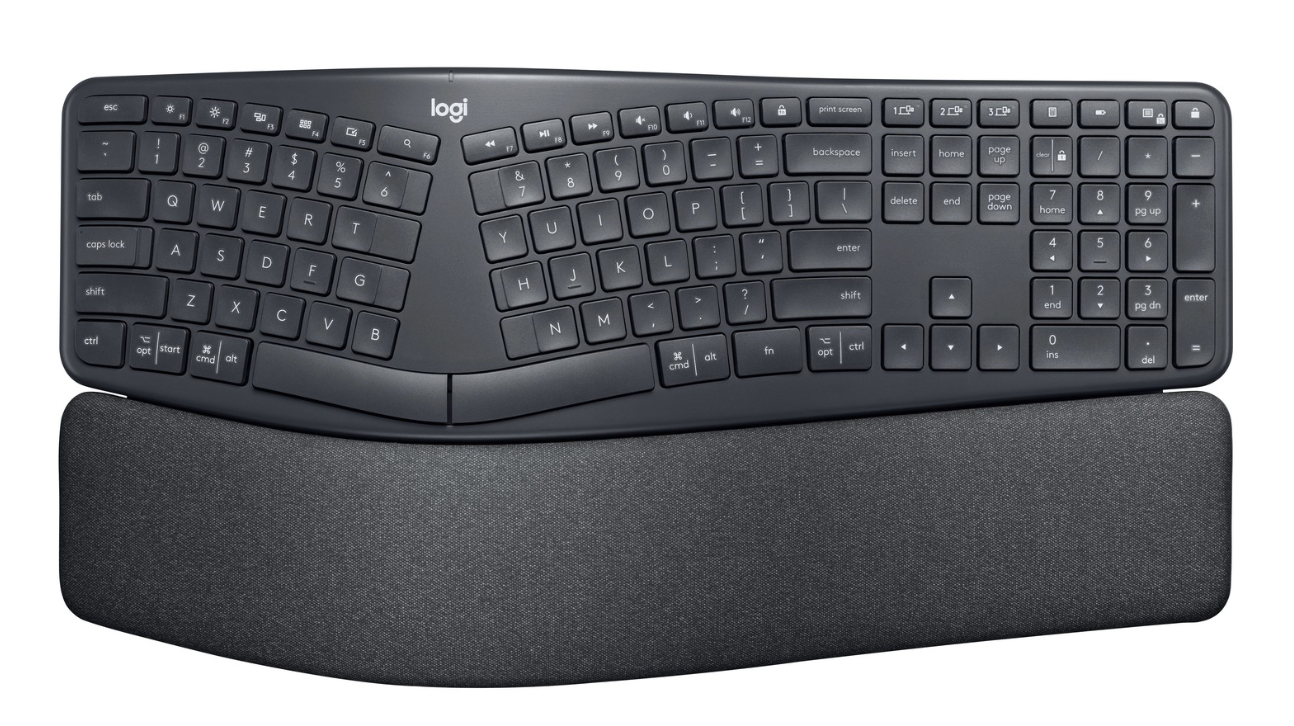
Pffff… spending €130 on a keyboard… you'd have to be a bit crazy… the dumps are full of them… and yet, after loooong hesitation and a bad case of tendinitis, I finally did it — and I don't regret it.
You'll go from the status of "keyboard basher who goes clack clack clack and bothers everyone in the room" to that of "typing virtuoso people listen to with envy." It's raised in the middle and has a slightly curved shape, which lets the fingers fall "naturally" onto the keys. And what genius to have split the space bar in two!
To try it is to adopt it. Real working comfort, surprising and unexpected.
Fun fact
Now I even add words on purpose to spend more time typing, it's so pleasant. That's what I just did writing this sentence, and then this letter: o, and then this one: m, and this character — & — whose name we can never remember. It's called the ampersand… I'll stop there.