

Reservation software for travel agencies: from the signed quote to the field
Operations is the operational module of TOOGO: it automates supplier bookings, centralizes information and drives the payments and planning of every group.
Operations is the operational module of TOOGO, the all-in-one ERP for inbound travel agencies (DMCs): it automates bookings, centralizes client and supplier information, and drives the payments and planning of every group. It is the travel agency’s reservation software on the supplier side: hotels, transport, guides, excursions. As soon as an itinerary is validated and signed by the client, the file goes automatically to Operations. The agency can manage several operations centres (several offices), each product being automatically attached to its own operations centre.
The journey of a file
Managing bookings with suppliers
As soon as a file reaches Operations, TOOGO centralizes the automatic sending of bookings to suppliers and the real-time tracking of their status.
Every service of the file in a single list
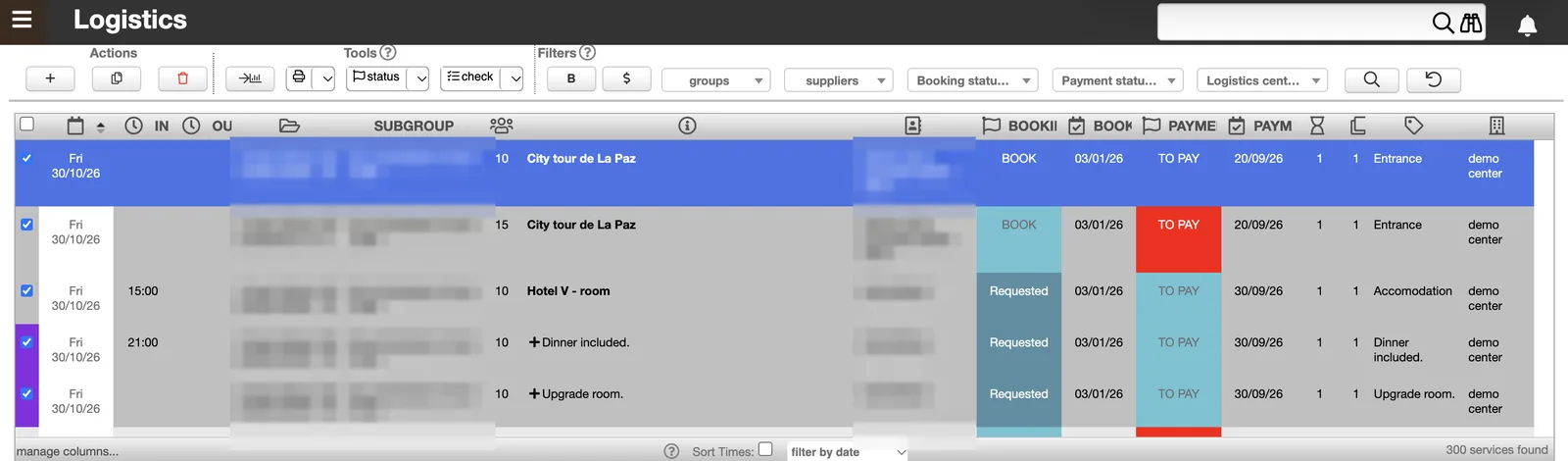
- Centralized list of all the services of the file (dates, sub-group, number of pax, supplier, booking status and payment status, service category, operations centre), with customizable columns
- Advanced multi-criteria search: by group, travel agency, supplier, booking agent, operations centre (operational centre), financial centre, booking status, payment status, or content of custom fields
- Quick “TO BOOK” filter in the list of services to switch instantly to the booking view, clearly distinct from the payments view
- Manual addition of services directly in Operations, classified by category (hotel, transport, excursion, cruise, etc.), automatically attached to an operations centre, with translation of the service name and category into the client’s language
- Default or chosen supplier: each product can be attached by default to a supplier, or left open so that the agency chooses the supplier at the time of booking; the supplier’s information (contact details, payment method and currency, associated financial centre) is itself configured in the database to automatically feed the booking and, later, the payment
Automatic sending of bookings
- Automatic sending by email to suppliers, grouped by operations centre, with a predefined message template adapted to each type of supplier (e.g. “Hotel” template), pre-filled traveller sheet (names, phones, emails), programme and service dates, and a direct link for the supplier to confirm the booking
- Grouped sending in one go for several selected services (several hotels, for example), with automatic update of the date and booking status, copy (BCC) to the agent, and optional PDF attachment
- Possible connection with WhatsApp for sending booking requests and reminders (follow-ups) directly to suppliers
- Custom fields that can be pre-filled automatically, with dynamic variables (such as the supplier’s name), to speed up data entry at the time of booking or confirmation
Statuses, controls and security
- Booking statuses and payment statuses tracked separately, with dedicated views and sorting for each (by supplier, by bank or financial centre, etc.)
- Statuses fully customizable by each DMC according to its own processes
- Locking of services once confirmed, to secure bookings already handled
- Built-in automatic controls: checking of the total of payments, allotments, double bookings (same group at the same hotel, or same guide on two services at the same time), missing translations, and calculation of the amount due to the guide
- Bulk recalculation of service costs and prices, with comparison between the current cost and the new cost
Follow-ups and tracking tasks
- Tracking tasks assigned by service (due date, assigned employee, category, description) to organize supplier follow-ups: service reconfirmation, invoice requests, etc.
- Automatic assignment: a Task Manager even lets you automate this assignment according to rules configured per operations centre (e.g. a supplier always handled by the same person automatically generates their task)
- Personal filter: everyone can filter, directly from Operations, their own tasks and their own operations centre
Field information that feeds the travel documents
The information gathered in Operations automatically feeds the documents given to travellers, thanks to configurable custom fields and dedicated templates.
- Library of ready-to-use custom fields, selectable in one click on each service (e.g. Meal Type, Diet requirement, Flight/bus/train details, Pick-Up time, Route, Drop-Off time, meeting, meeting points), some with automatic dynamic values (e.g. the service time)
- A single entry: you only need to enter the information once, from the file preparation, for it to then appear directly in the travel document
- A tailor-made travel document: this information prepares and feeds the travel document, itself generated from the client file using a specific, configurable template in the document editor, which defines precisely which information must appear for each type of trip or client
Paying suppliers, without mixing with bookings
Operations handles in parallel two clearly distinct tasks, which can be carried out simultaneously by different people: all the operational information needed in the field (supplier details, guide details, times) to run the bookings, and the tracking of supplier costs and payments, with at all times a clear view of what remains to be paid. One person can thus book while another checks payments, without ever mixing the two tracks.
A view dedicated to payments
- Payments view separate from the bookings view, with the same multi-criteria filters as the list of services: by group, agency, supplier, payment status, operations centre
- Quick “$” filter in the list of services to switch instantly to the payment view and see at a glance what remains to be paid, without mixing with the booking tracking
- Payment status and date shown for each service, independently of the booking status and date: two distinct tracks, that of booking statuses and that of accounting tracking (payment, invoicing) by supplier
- Payment method, financial centre and currency configured per supplier (e.g. payment by bank transfer), with tracking of the planned cost, the amount already paid and the remaining balance due, and a dedicated field to attach the proof of payment on the service
- Payment window shown by default for each supplier (start date and payment deadline), according to the conditions configured in their record
Proofs of payment, grouped payments and alerts
- Proof of payment generated automatically per supplier (group, trip dates, service concerned, forecast price, actual cost and balance due), ready to be downloaded, exported to PDF or emailed directly to the supplier
- Grouped payment possible: the same supplier paid for several services or several groups in one go, with the corresponding document generated automatically
- Automatic alerts in red in case of inconsistency, for example when the currency in which the service was quoted does not match that of the financial centre selected to pay it: TOOGO immediately signals that the payment is not possible as is
- “Send to finance” button: one or several selected services, even from several different groups at once, go automatically as an expense into Finance, attached directly to their group and their original service, and are immediately applied to the margin calculation of each file
The task manager: organizing the team’s work
TOOGO’s task manager lets your team organize its daily work in the same software where it manages its groups, clients, products and flights. Each task is linked to what actually needs to be done: no one has to look for the information elsewhere.
- Tasks with context: name, description, date, owner, status and category, linked to a group, a client, a product or a flight.
- Three ways to view them: in a list (search and filters), in a kanban board (drag and drop from one column to another according to progress), or in a calendar (month, week, day).
- Teamwork: comments and mentions directly in the task (one person, a whole department or the entire team); each person mentioned receives their notification.
- Notifications and reminders: reminder by email or WhatsApp; each agency decides which events trigger a notification and who receives it.
- Automatic tasks: the system generates tasks from the trip dates and adjusts them automatically when those dates change.
- Control and traceability: only the creator of a task can edit it fully (the others view it); you can always see who created it and when, with an internal note possible.
- Bulk actions: copy or delete several tasks at once.
- Multilingual: available in Spanish, English, French and Portuguese.
Planning: driving all activity on a calendar
Like the Dashboard, Planning is a full access of its own in TOOGO, separate from the Operations module but fed by the same data, to offer cross-cutting calendar views and visually drive all activity: bookings, payments, movements and group fill.
- Planning by supplier: day-by-day calendar view for each supplier, showing the group concerned and the booking status of the service (Confirmed, Book, Book Again), filterable by category and by supplier
- Planning by group: calendar view showing, for each group, the “title of the day” scheduled in the file (stage or route of the day), filterable by country, region and place
- Panoramic status view: for each group, all its services with the booking status and payment status shown side by side, a combined view that is handy day to day, even though booking and payment remain two distinct tracks in TOOGO
- Group geolocation: interactive map of each touring group’s route of the day, with filter by group, region, place and service date, and direct sending of information to travellers or travel agencies
- Departures planning: calendar of upcoming departures with, for each group, a checklist of actions to carry out before the trip (sending the client space, payment tracking, etc.)
- Tracking of fixed-date group departures (GIT): capacity, number of registered participants, minimum fill threshold and availability shown by colour code (available, below the required minimum, full, overbooked), to drive the opening to sales and the offer to prospects
Every confirmed file becomes an action plan
TOOGO Operations turns every confirmed file into an automated operational action plan, from the first email to the supplier to the document given to the traveller.
- Automation from the Trip Builder to Operations: a validated itinerary immediately becomes, with no re-entry, a list of services to book
- Centralized management of bookings and payments, supplier by supplier, with configurable statuses tracked separately
- Calendar planning to view at a glance bookings, routes and group fill
- Upstream preparation, from Operations, of the information that feeds the travel document, then generated from the client file, with no double entry
- Integrated management of several operations centres, with no additional module or development, for multi-office or multi-destination agencies
FAQ about TOOGO Operations
It is the tool that sends bookings to suppliers (hotels, transport, guides, activities) and tracks their confirmation and payment. In TOOGO, it is the Operations module: it starts directly from the validated and signed itinerary, with no re-entry.

All the operations of an inbound agency
From the signed quote to the document given to the traveller, Operations covers all the operations of an inbound agency. Want to see it on your own organization? The TOOGO team will prepare a personalized demonstration.